In the rapidly evolving world of web development and digital marketing, the way we create and deliver content is changing faster than most of us realize. If you have been researching website architectures recently—or simply trying to understand what your development team keeps talking about—you have almost certainly come across the term headless CMS. It sounds technical, maybe even a bit intimidating, but the concept behind it is simpler than you think, and understanding it could fundamentally change how your content reaches your audience.
But what exactly is a headless content management system beyond the buzzword? Why are developers enthusiastically abandoning traditional platforms they trusted for years, and what does this shift mean for you as a content creator or marketer who just wants to publish great work without fighting the tools? These are the questions that matter, and they rarely get answered in plain language.
In this comprehensive guide, we will break down the differences between headless and traditional systems without the jargon that usually clouds this topic. We will explore the real pros and cons of each approach honestly, provide a clear comparison table you can actually use to make decisions, and introduce a revolutionary tool that finally bridges the frustrating gap between complex, developer-centric code and the user-friendly content creation experience marketers desperately need.
💡 Pro Tip: Before we dive deeper, if you are still evaluating your foundational platform options, you might want to read our detailed breakdown on how to choose the best content management system this year. It sets the stage for everything we will discuss here.
Understanding the Traditional CMS: The Monolithic Architecture
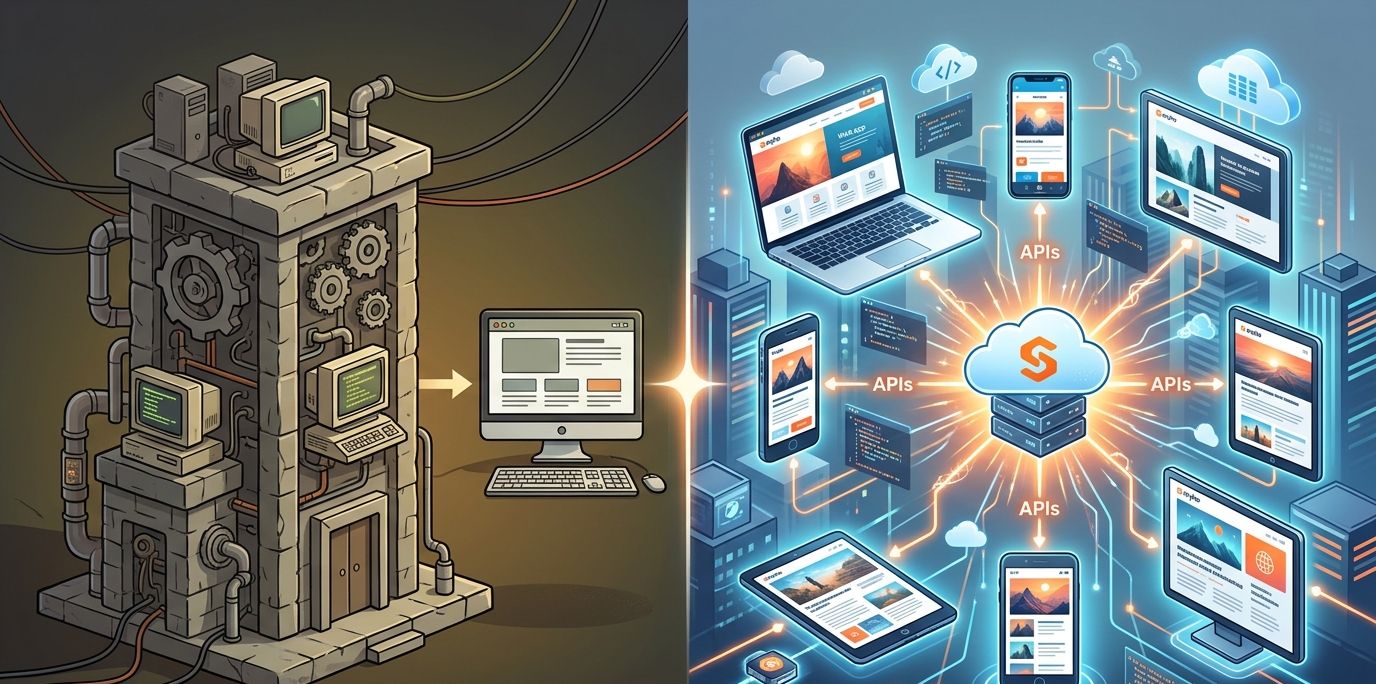
To truly understand what "headless" means, we first need to look at the body it leaves behind. A traditional CMS (often called a monolithic CMS) tightly links the backend—where you write and store your content—with the frontend—which is the design, templates, and presentation layer your visitors actually see on their screens. Think of it like a television with a built-in DVD player: everything is one unit, and you cannot separate the parts.
The most prominent example of a traditional system is WordPress, which powers over 40% of the entire web according to W3Techs. In a traditional CMS, everything is bundled together tightly:
The database stores your articles.
The server-side code processes requests.
The plugins extend functionality.
The visual theme controls how every single page looks.
When you hit that publish button, the system pulls your raw content from the database, stuffs it into a pre-designed HTML template (like pouring concrete into a mold), and delivers the finished page to your reader's browser.
The Pros:
The advantages of this approach are clear and explain the dominance of platforms like WordPress. It is genuinely beginner-friendly. Marketers and content creators get a visual interface—the familiar WYSIWYG editor—that lets you format text, drag in images, and preview exactly how things will look before going live. You can manage an entire website from one dashboard without touching a single line of code.
The Cons:
However, the drawbacks have grown harder to ignore as the internet has matured. Because the backend and frontend are coupled so tightly, delivering your content to modern platforms beyond a simple website becomes extremely difficult. We are talking about mobile apps, smartwatches, digital billboards, voice assistants, and the expanding universe of IoT devices.
Furthermore, the heavy reliance on plugins to add even basic features creates a serious problem called plugin bloat. Each new plugin adds weight to your site, slows down page loading speeds (which directly hurts your Google rankings), and introduces potential security vulnerabilities. A study by Patchstack showed that plugins account for over 90% of WordPress security vulnerabilities reported annually. This is not a small problem; it is a structural weakness.
What Is a Headless CMS, Really?
A headless CMS is a content management system that provides a backend for storing and managing your content, but it completely refuses to dictate how that content is presented to the end user. In simple terms, it has had its "head"—the frontend presentation layer—chopped off. What remains is a pure content repository with an API (Application Programming Interface) that delivers your content as raw, structured data to anything that asks for it.
Instead of binding your carefully crafted text and images to a specific website theme forever, a headless CMS delivers your content as data. Developers can then use modern, lightweight frameworks like Next.js, React, or static site generators like Hugo to fetch this data and build incredibly fast, custom user interfaces across any device imaginable.
Your content lives in one central hub and goes wherever it is summoned. The website becomes just one stop on a much longer journey rather than the only destination. To give you a real-world example, companies like Nike use headless architectures to push product descriptions and marketing copy simultaneously to their website, their mobile app, in-store displays, and social commerce channels without duplicating any work. This is omnichannel publishing at scale.
Headless CMS vs. Traditional CMS: A Clear Comparison
When you place these two architectures side-by-side, the differences become stark, and they will directly shape your content strategy moving forward. Here is a table that breaks down the key distinctions:
FeatureTraditional CMS (e.g., WordPress)Headless CMSArchitectureTightly coupled frontend and backend in one unitFully decoupled backend connected via APIsEase of Use (Marketers)Very high with visual WYSIWYG editors & live previewsOften very low, as many lack visual editing toolsOmnichannel DeliveryLimited; mainly designed for a single websiteUnlimited; push content to web, apps, IoT, and morePage SpeedOften slower due to database queries and plugin bloatExtremely fast via static files served through CDNsSecurityMore vulnerabilities due to exposed databases & pluginsFewer attack surfaces as no database is publicly exposedDeveloper FlexibilityLimited by theme and plugin constraintsComplete freedom to build any frontend with modern frameworksBuilt-in SEO ToolsAvailable via external plugins (like Yoast or Rank Math)Rarely built-in; requires separate optimization workflowsContent RepurposingManual process requiring separate toolsVaries, but generally still a manual external processTeam CollaborationUser roles exist, but granular control often needs pluginsRole-Based Access Control (RBAC) often built-in at the API level
As you can see, neither option is perfect across every category. Traditional systems win on ease of use for marketers but lose badly on speed, security, and omnichannel reach. Headless systems win on flexibility and performance but leave content creators stranded without the visual tools they need to work efficiently.
The Hidden Problem Nobody Discusses About Headless Architecture
Now we must address the elephant in the server room. While developers and technical architects genuinely love headless systems for their speed, flexibility, and clean modern codebases, the content creators and marketers who actually produce the work often end up feeling abandoned and deeply frustrated.
Why does this happen so consistently?
Because going headless in the traditional sense almost always means sacrificing the visual tools and intuitive interfaces that marketers rely on.
You lose the live preview.
You lose the easy drag-and-drop media libraries.
Most critically, you lose the built-in SEO analyzers that guide you toward better rankings as you write.
In many headless setups, marketers find themselves typing raw, unformatted text into rigid database fields that look like spreadsheets from 1995 while hoping for the best. The creative flow evaporates, and the content production pipeline grinds to a painful bottleneck where every small change requires a developer ticket, a Slack message, and a wait time that can stretch into days.
The Bridge Between Two Worlds: How Snyho Solves This Dilemma
What if you could give your development team the blazing-fast, secure headless architecture they dream about, while simultaneously giving your marketing team an ultra-modern, visually rich workspace they actually enjoy using every single day?
This is exactly why we built Snyho.
Snyho is the ultimate desktop content workspace designed from the ground up to eliminate the friction between developers and marketers. It stands as a bridge between WordPress ease and headless speed. It is not just another slow web dashboard, and it is not another plugin that adds to your bloat problem. It is a powerful desktop application that lives directly on your machine and supercharges your entire content workflow—whether you are running a traditional WordPress setup or managing a highly technical Git-based CMS powered by GitHub and Jamstack principles.
Here is how Snyho elegantly solves the headless vs. traditional dilemma:
The Smart Dual-Output Editor: You write in a beautiful, distraction-free visual WYSIWYG environment. Behind the scenes, Snyho seamlessly translates your work into perfectly clean HTML that drops right into WordPress, or pure Markdown that flows directly into Git repositories and headless setups. Nobody compromises, and nobody waits.
Seamless Cross-Platform Publishing: Connect your Snyho Workspace directly to your traditional CMS or your developer's repositories and push content instantly with a single click. No technical skills are required, and no time is wasted copying and pasting.
Built-In Real-Time SEO Magic: Snyho fixes the glaring SEO gap in headless setups by embedding a live SEO analyzer directly inside the editor. The score updates continuously from 0 to 100, giving you instant feedback on keyword density and structure. The AI Magic Wand even generates the perfect focus keyword and meta description automatically.
Powerful Content Repurposing Engine: Snyho's AI reads your long-form article and instantly repurposes it into a Twitter thread, a LinkedIn post, and a video script. You can tweak the tone and schedule everything through the built-in Kanban board.
Granular Team Permissions: Enterprise-grade security meets intuitive team collaboration. You can restrict access precisely so your social media manager only sees social drafts, while your publisher manages final website uploads.
📚 Further Reading: To explore how API-first approaches are reshaping the industry, check out the detailed explainer by Contentful, one of the pioneers in the headless space. Additionally, WPBeginner offers an excellent plain-language comparison of traditional and headless CMS architectures.
An Exclusive Invitation to Experience Snyho Completely Free
We firmly believe you should never have to compromise between blazing website speed and smooth content creation efficiency. That is why Snyho is currently in its early launch phase and is 100% free to use with every single premium feature fully unlocked.
There are no hidden trials that lock you out after 7 days, no credit card demands before you see the value, and no crippled features hidden behind an upgrade prompt.
Say goodbye to messy fragmented workflows and the soul-crushing tool fatigue that comes from juggling five different apps. Download Snyho today and take complete control of your entire content ecosystem from one beautiful desktop application.
The Final Verdict
The debate between a headless CMS and traditional systems is not really about which architecture wins on a technical specification sheet. It is about what actually enables your entire team—developers and marketers working together—to produce their best work without friction or delays.
By adopting a workspace like Snyho, you bridge the gap entirely. The headless revolution does not have to leave your writers stranded in a world of raw code, and your developers do not have to dread the next content request. Everyone wins.
(If you want to revisit the broader platform selection criteria before making your final decision, make sure to read our in-depth guide on choosing the best content management system this year. It perfectly complements everything we have discussed here.)